With VMware licensing costs continuing to rise and pressure on IT budgets increasing, many organisations are reconsidering their virtualisation strategy. For businesses already invested in Microsoft, the transition to Hyper-V provides a cost-effective and reliable alternative.
The good news: most organisations already own the necessary Windows Server licences that include Hyper-V rights. By making the most of these existing entitlements, IT leaders can reduce costs, simplify licensing, and modernise their on-premises infrastructure without compromising performance or manageability.
Leverage the Licences You Already Have
Windows Server licensing provides built-in virtualisation rights through Hyper-V:
- Windows Server Standard Edition – includes rights for 2 Operating System Environments (OSEs) / Virtual Machines.
- Windows Server Datacenter Edition – includes unlimited OSEs, making it ideal for highly virtualised environments.
This means that many organisations are already licensed to run Hyper-V without additional cost, eliminating the need to pay for VMware licences on top of Microsoft subscriptions.
Cost Savings at a Glance
Migrating from VMware to Hyper-V can yield savings in multiple areas:
- No additional virtualisation licence fees (Hyper-V rights already included with Windows Server).
- Simplified licensing management, reducing administrative overhead.
- Tighter integration with Microsoft ecosystem, including Active Directory and Azure hybrid services.
- Predictable future costs by consolidating under existing Microsoft agreements.
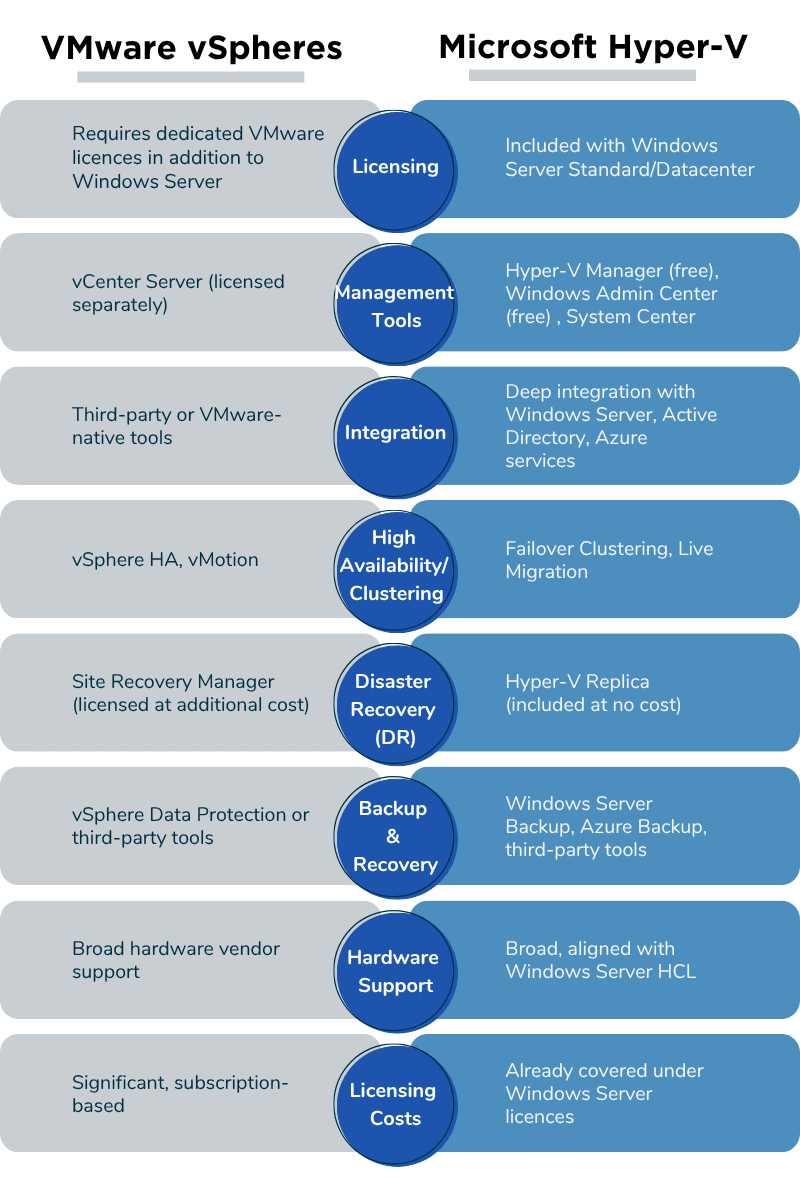
VMware vs Hyper-V Comparison

Migration Approach
Transitioning from VMware to Hyper-V can be straightforward with the right planning. Microsoft and third parties provide free and low-cost tools to assist:
- Disk2VHD – A free Microsoft Sysinternals tool to convert existing VMware virtual machines into VHD format for Hyper-V.
- VM Conversion extension (PREVIEW) – Use Windows Admin Center to migrate VMware virtual machines from vCenter to Hyper-V at no cost.
- Build New for Legacy Workloads – For older Windows Server versions and Linux distributions, a “build new” approach is often more effective than direct conversion. This involves deploying fresh virtual machines on Hyper-V, installing the required OS, and then migrating application data and configurations. It ensures compatibility, removes technical debt, and reduces the risks of carrying forward unsupported systems.
- Step-by-Step Strategy:
- 1. Assess – Review workloads, licensing entitlements, and dependencies.2. Plan – Prioritise non-critical workloads first to validate migration process.3. Convert or Rebuild – Use Disk2VHD for compatible VMs; adopt a “build new” strategy for older Windows/Linux workloads.4. Test – Validate application functionality, networking, and integration.5. Optimise – Apply performance tuning and integrate with Hyper-V management tools.
Key Gotchas to Watch For
While the VMware-to-Hyper-V path is clear, IT leaders should be mindful of potential challenges:
- Legacy Applications – Some older workloads may rely on VMware-specific drivers or behaviours. Testing is critical. Checking key services that run after the migration is critical.
- Licensing Tied to MAC Addresses – Certain third-party or legacy applications use MAC address-based licensing; migrating may require re-licensing or adjustments.
- Hardware Compatibility – Ensure servers meet Windows Server and Hyper-V hardware compatibility lists (HCL).
- Operational Change – Admin teams may need training on Hyper-V management tools (though many concepts overlap).
Conclusion
For IT leaders seeking to reduce costs, simplify operations, and make the most of existing investments, moving from VMware to Hyper-V represents a practical and strategic path forward. With Windows Server licensing already covering Hyper-V, organisations can modernise their on-premises environments, avoid double-paying for virtualisation, and position themselves for future hybrid integration to Azure.
Next Step: Start by identifying which of your current workloads are ready for Hyper-V — you may already be licensed to run them today, at no extra cost.
👉 Book a Migration Readiness Assessment
👉 Talk to Our Virtualisation Experts