Published On: October 29, 2026

Moving business systems from on-premises infrastructure to Microsoft Azure requires careful planning, application assessment, security controls and a tested migration process. To understand how to migrate to Azure, Singapore businesses should begin with a cloud readiness assessment, define their migration goals, map application dependencies, estimate costs and select an appropriate migration strategy. A structured plan helps organisations reduce downtime, protect business data and maintain compliance while moving workloads to the cloud. CloudPoints Consulting Pte Ltd supports businesses in planning cloud infrastructure changes that align with operational requirements and long-term IT objectives.
Azure migration is the process of moving applications, databases, servers, files and other IT resources from an on-premises data centre or another hosting environment to Microsoft Azure. The process can involve moving existing systems with minimal changes, modifying applications for cloud services or rebuilding selected workloads using cloud-native technologies.
For businesses in Singapore, Azure migration can support data centre consolidation, remote access, business continuity and improved infrastructure management. However, moving systems without reviewing their dependencies, security requirements and operating costs can create avoidable problems.
A successful Azure migration strategy establishes clear priorities before any workload is moved. It considers business requirements, technical limitations, regulatory obligations, recovery targets and the skills available within the IT team.
Organisations may consider Azure migration when their existing infrastructure is expensive to maintain, approaching the end of its support life or unable to meet changing business requirements.
Common reasons include:
Cloud migration does not automatically reduce costs or improve security. Results depend on architecture, configuration, workload usage and ongoing management.
Azure migration generally follows six stages, from initial assessment to post-migration optimisation. Each stage reduces a different category of risk.
Begin by documenting physical and virtual servers, operating systems, databases, applications, storage, network connections and external integrations.
A cloud readiness assessment should identify:
Microsoft’s Azure Migrate platform can help assess on-premises environments, estimate Azure resource requirements and identify migration considerations for supported workloads.
Not every application should be moved in the same way. Choose a migration approach based on business value, technical complexity, risk and available resources.
Common approaches include:
A phased migration is often appropriate for complex environments. Start with lower-risk workloads, learn from the initial move and apply those lessons before migrating business-critical systems.
Before moving production workloads, plan the target environment. This includes subscriptions, resource groups, identity, network connectivity, security controls, monitoring and backup.
Azure networking needs particular attention. Review IP address ranges, routing, DNS, firewall rules, private connectivity and communication between cloud and on-premises systems. Overlapping IP ranges can complicate connectivity, especially when both environments must operate together during migration.
The target Azure architecture should also define:
For Singapore organisations subject to the Personal Data Protection Act (PDPA) or sector-specific requirements, assess data handling, contractual obligations, access arrangements and cross-border transfers before selecting a deployment design.
Prepare the destination environment, validate connectivity and confirm that backups are recoverable before moving production systems.
Azure VM migration may involve replicating servers, testing replicated workloads and scheduling a cutover. Database migration requires additional checks for compatibility, data consistency, transaction activity and application connection settings.
A typical migration sequence is:
Keep the original environment available until the migrated system has passed agreed acceptance tests and rollback conditions have been reviewed.
A successful server start does not prove that a migration is complete. Test application functions, user access, integrations, scheduled jobs, reporting and transaction processing.
Confirm that Azure backup policies run as expected and that restoration works. Azure Site Recovery can support replication and recovery for eligible workloads, but it requires appropriate configuration and testing.
Document the recovery procedure, responsible personnel, recovery time objective (RTO) and recovery point objective (RPO). These targets describe how quickly services must return and how much data loss the business can tolerate.
Once workloads are stable, review actual resource usage and operating costs. Azure cost optimisation may involve right-sizing virtual machines, removing unused resources, selecting appropriate storage tiers and using reservations or savings plans for eligible predictable workloads.
Review performance, security alerts, backup status and access permissions regularly. Establish clear ownership for monitoring, patching, incident response and budget reviews.
Use this checklist before approving a production migration.
The checklist should be adapted to the size and risk profile of each organisation. A small application migration may require fewer planning activities than a complex environment supporting financial transactions or regulated data.
Five considerations deserve particular attention before committing to a migration schedule.
Business impact: Identify acceptable downtime, critical operating periods and the consequences of an unsuccessful cutover.
Application compatibility: Legacy software may rely on unsupported operating systems, hardware-specific components or fixed network configurations. Confirm vendor support before moving it.
Data security and governance: Determine where data will be stored and processed, who can access it, how long it must be retained and how it will be protected.
Total cost of ownership: Include compute, storage, network traffic, connectivity, security tooling, support, licensing and migration services. Compare these costs with existing infrastructure expenses.
Internal capability: Assess whether the IT team can manage Azure identity, networking, monitoring, incident response and cost controls. Training or external support may be needed.
CloudPoints Consulting Pte Ltd can help organisations evaluate these requirements and plan infrastructure changes around business priorities, technical dependencies and operational constraints.
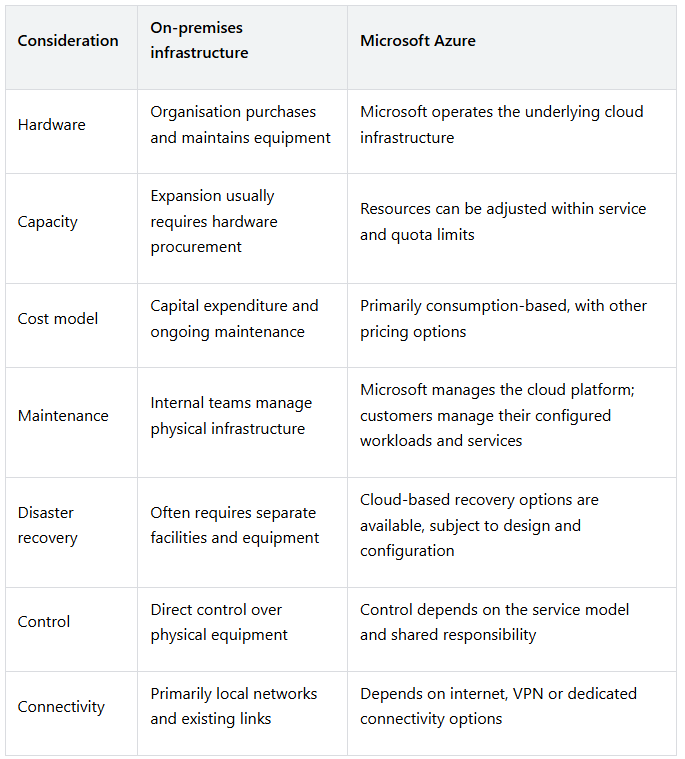
Azure is not automatically the right destination for every workload. Some systems may be better retained on-premises or operated in a hybrid cloud arrangement while technical constraints are addressed.
Migration projects often encounter problems because teams focus on moving servers rather than preparing the entire operating environment.
Avoid these mistakes:
A documented migration plan, a controlled pilot and clear approval criteria help teams manage these risks.
The timeline depends on the number of workloads, application complexity, data volume, network capacity and testing requirements. A straightforward server move may take days or weeks to plan and complete, while a large enterprise migration can run for several months or longer.
Costs depend on the infrastructure being moved, the Azure services selected, usage patterns, connectivity, licensing and migration support. Use the Azure Pricing Calculator to estimate recurring service charges and prepare a separate budget for assessment, migration, testing and ongoing management.
Some workloads can be migrated with minimal interruption using replication and planned cutover. Others require a maintenance window, particularly when databases, legacy applications or complex integrations are involved. Downtime should be assessed and agreed for each workload rather than assumed to be zero.
Azure provides security capabilities for identity, networking, encryption, monitoring and threat protection. Security still depends on correct configuration, access management, patching, data governance and the division of responsibilities between Microsoft and the customer.
Azure migration moves workloads to Azure, sometimes with few application changes. Azure modernisation changes applications or their underlying services to improve maintainability, performance or cloud integration. An organisation can migrate first and modernise selected applications later.
Yes. A hybrid cloud model allows selected systems to remain in the existing data centre while other workloads run in Azure. This can be useful for legacy applications, latency-sensitive systems or workloads that require additional preparation before migration.
A well-planned Azure migration starts with a clear view of existing systems, business priorities and operational requirements. Assessing dependencies, designing secure Azure networking, testing recovery procedures and monitoring costs helps Singapore organisations make informed infrastructure decisions.
Before committing to a migration date, review the plan against technical readiness, security obligations and business continuity requirements. If your organisation needs support with assessment, architecture, migration planning or ongoing cloud management, contact us to discuss your requirements and identify practical next steps for your Azure environment.
Australia
P: +61 3 9087 8057 E: info@cloudpoints.com.auSingapore
P: +65 6990 7890 E: info@cloudpoints.com.sg